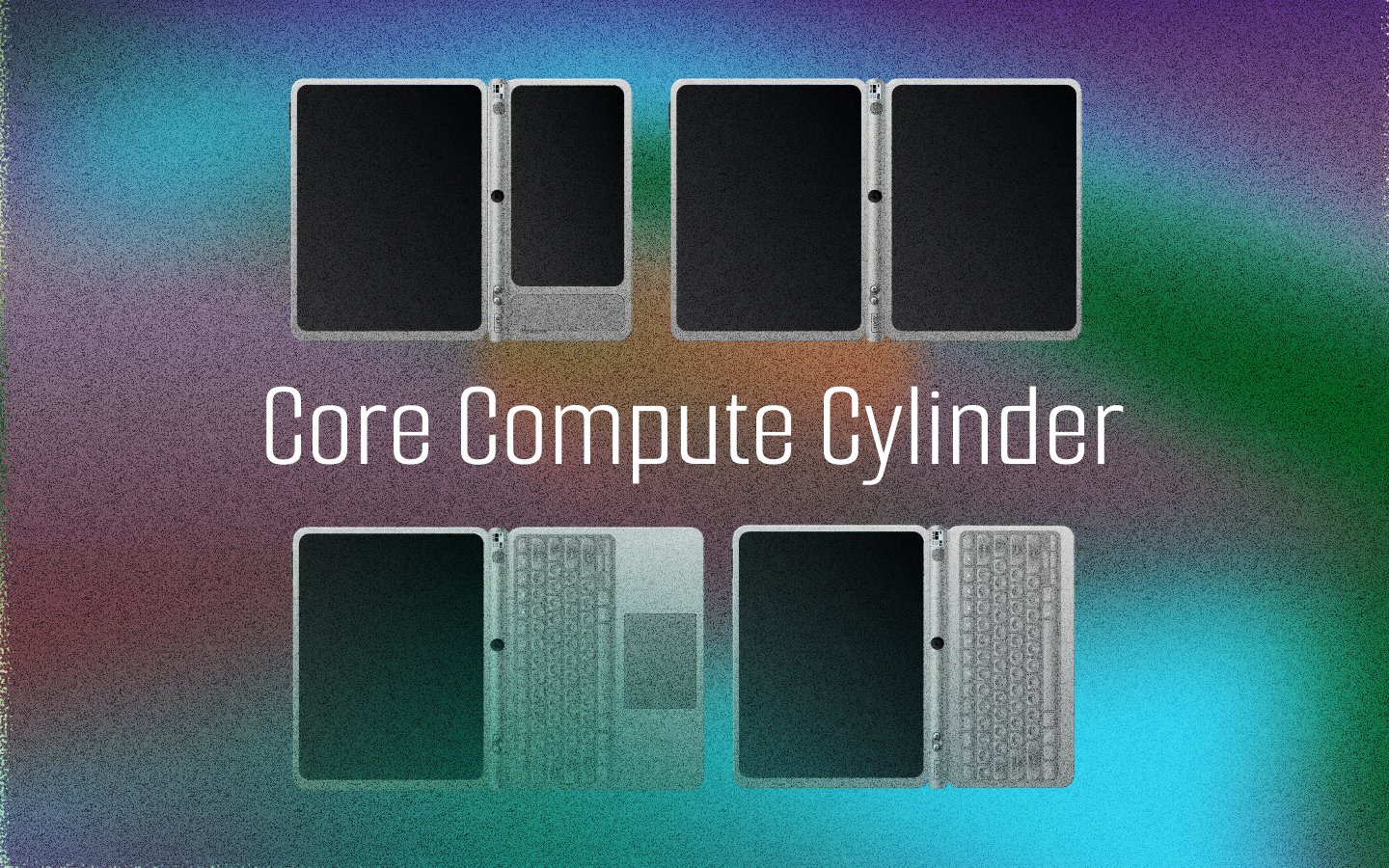
Computing devices have been trapped in rigid form factors for decades, a laptop is always a laptop, a tablet always a tablet. Working alongside industrial designers, software developers, and hardware engineers, I led the UX research and interaction design for a modular computing device built around a cylindrical core with hot-swappable display modules capable of transforming into a tablet, laptop, dual-screen workstation, or e-reader. My role focused on shaping the device's physical form through user research with K-12 communities, designing the dual-screen interaction model, and ensuring every hardware decision traced back to a real classroom need.
The Vision
What if a single compute device could transform into whatever form factor a student or teacher needs at any given moment? The Core Compute Cylinder (CCC) is a modular computing device built around a cylindrical core that houses all processing power, battery, and connectivity. By mating with hot-swappable display modules through a magnetic rail system, it can seamlessly transform between a tablet, laptop, dual-screen workstation, or standalone e-reader.
I led the industrial design and UX research for this project, working to ensure that every configuration felt intentional, that transitions between modes were intuitive, and that the device's physical form was driven by real needs uncovered through research with K-12 students, teachers, and IT administrators.
The result is a patent application currently in progress, covering 9 protectable claims for a modular system that puts adaptability, durability, and educational equity at the center of computing device design.
User Research for Education
I conducted user research across three key stakeholder groups in the K-12 education ecosystem to understand how computing devices are actually used, maintained, and managed in classrooms.
Research Questions
- How do students interact with computing devices across different learning contexts (reading, writing, testing, collaboration)?
- What are the primary pain points for teachers managing classroom technology?
- How do IT administrators handle device procurement, maintenance, and lifecycle management?
- What physical and environmental conditions do education devices need to withstand?
- How do cost constraints shape technology adoption decisions in schools?
Guided Research Questions
Organized by stakeholder group to map needs across the ecosystem.
- How do reading habits differ between e-ink and LCD during extended study sessions?
- At what point does screen fatigue affect comprehension and retention?
- When do students switch between reading, writing, and watching — and what triggers it?
- What form factor feels natural for different postures — desk, lap, lying down?
- What are the biggest technology-related disruptions during a typical class?
- How do teachers currently push content, monitor screens, and manage assessments?
- What would make device management invisible — so teaching stays the focus?
- How do offline and low-connectivity classrooms cope with digital curriculum?
- What breaks most often, and what does the repair cycle look like?
- How are procurement decisions made — cost per unit vs total lifecycle cost?
- What would a repairable, modular device mean for annual IT budgets?
- How is device enrollment, security, and software updates currently handled?
Key Research Insights
Durability Needs
Devices in K-12 environments are dropped an average of 3-5 times per week. Current flat-slab designs concentrate impact force on screen edges and corners. Teachers reported that cracked screens were the single largest maintenance cost, often accounting for 40% of IT repair budgets.
Battery Life
A full school day is 6-8 hours, but many devices lose charge by early afternoon. Teachers described "battery anxiety" as a constant classroom disruption. Students sitting near outlets gained an unfair advantage, while others lost work time to charging rotations.
Display Readability
Extended reading on LCD screens caused reported eye fatigue in 68% of students surveyed. Teachers noted that students avoided long-form reading assignments on devices, preferring printed materials. E-ink displays emerged as a strong candidate for reading-heavy tasks.
Cost Constraints
Schools operate on 3-4 year device refresh cycles. A modular device where the core can be upgraded independently of displays could extend the useful life to 6-8 years, reducing total cost of ownership by an estimated 35-45% over a decade.
The Cylindrical Core
Why a cylinder? Every design decision traced back to user needs.

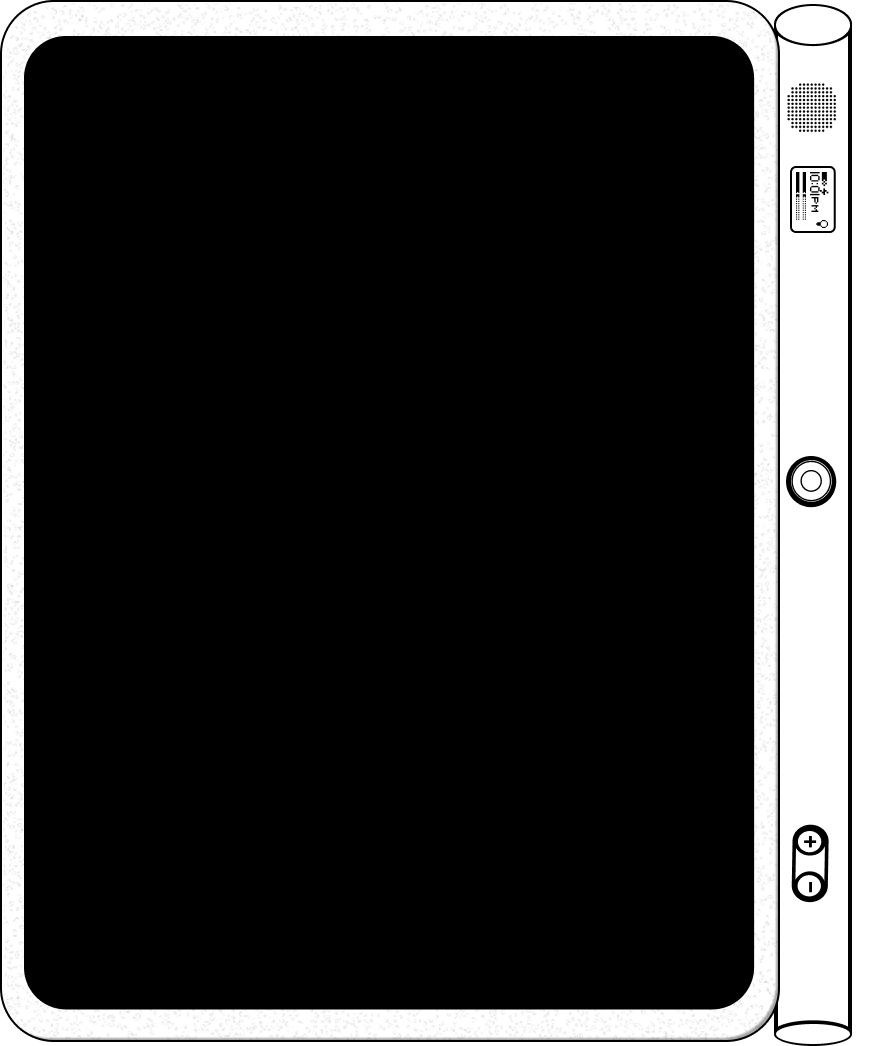
The cylindrical form factor was not an aesthetic choice - it emerged directly from research findings. When I analyzed how devices fail in education environments, three patterns became clear: impact damage concentrates at corners, heat builds up in thin flat enclosures, and students naturally grip cylindrical objects (pens, water bottles) more securely than flat slabs.
The cylinder eliminates corners entirely, distributing impact force across a curved surface. Its geometry naturally creates internal volume for airflow, enabling passive cooling without fans. And when held in hand, the 38mm diameter cylinder matches the ergonomic grip zone that my research identified as comfortable for both children (ages 8+) and adults.
Design Rationale
- Ergonomic Grip — The 38mm diameter cylinder falls within the optimal grip range for K-12 students aged 8-18, based on anthropometric data. It can be held single-handed for tablet mode or rests comfortably as a hinge spine in laptop mode.
- Structural Integrity — Cylindrical geometry distributes impact force evenly across the surface, eliminating the corner-strike vulnerability that causes 70% of device failures in schools. Drop-test simulations showed 3x improvement over rectangular enclosures.
- Thermal Management — The cylinder's internal volume allows for a natural convection chimney effect. Warm air rises through the core while cool air enters from the bottom, enabling fanless operation even under sustained educational workloads.
- Magnetic Latch + Rail System — Display modules attach via a flat mating surface along the cylinder's length. Rare-earth magnets provide secure attachment while a precision rail ensures perfect alignment. The coupling mechanism was designed so that even a 6-year-old can attach and detach modules independently.
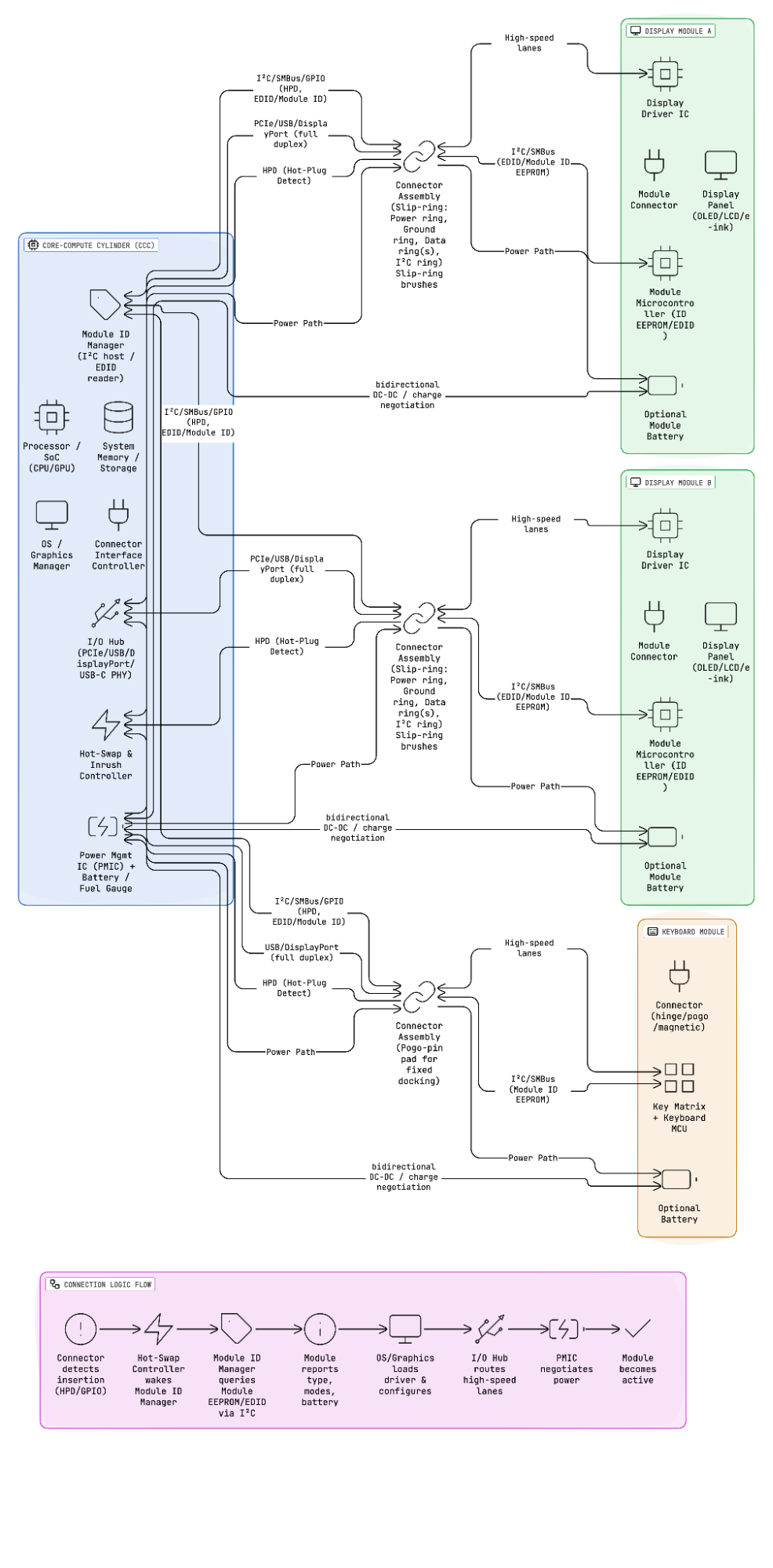
- Bidirectional Power Flow — The core can charge display modules, and display modules with auxiliary batteries can extend the core's runtime. This innovation means the device adapts its battery capacity to its current configuration.
Software Layer & Dual-Screen UX
How the system detects, adapts, and orchestrates content across modules.
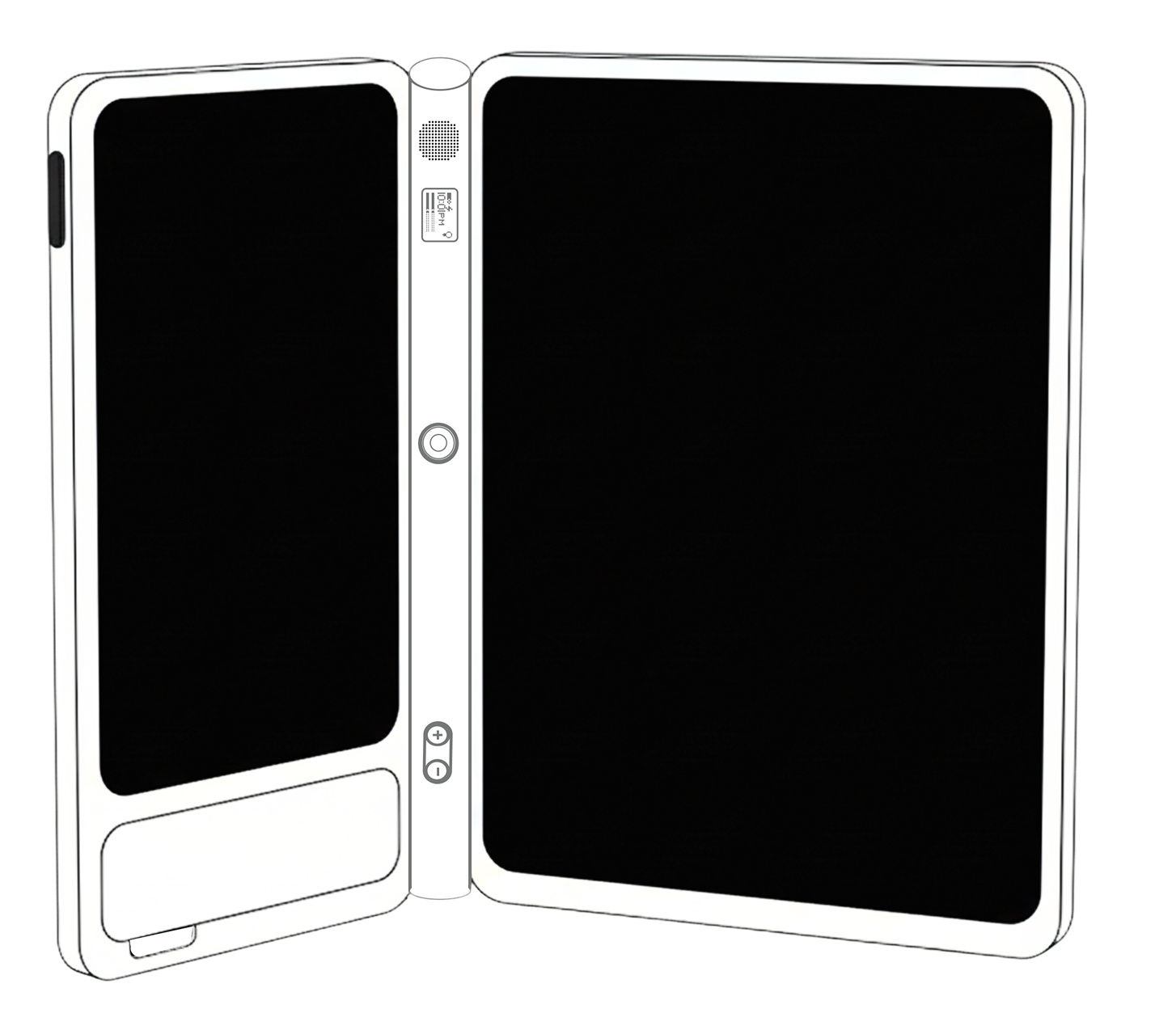
The most challenging UX problem was not the physical design - it was the software layer. When a student attaches an e-ink display to one side and an LCD to the other, the system needs to instantly understand the configuration and intelligently distribute content. I designed the interaction model so that this happens without any manual user input.
Each display module communicates its type, resolution, and capabilities through the magnetic connector. The operating system reads this metadata on attachment and triggers a configuration profile. In dual-screen mode, the system follows a principle I established: static content flows to e-ink, dynamic content flows to LCD/OLED.
For example, when a student opens a biology textbook, the reading content renders on the e-ink display for comfortable, paper-like reading. When they tap an embedded video or interactive 3D model, it launches on the LCD screen. The student never has to decide which screen to use - the content type determines placement automatically.
Dual-Screen Content Rules
- Text-heavy content (ebooks, articles, notes) always defaults to e-ink for reduced eye strain and extended battery life
- Video, animations, and interactive simulations route to the LCD/OLED display for full color and refresh rate
- In exam mode, the e-ink display shows the test while the LCD is locked, preventing distraction and enabling proctoring
- Handwriting recognition works on either display - stylus input on e-ink feels like writing on paper, a key request from teachers
- When only one display is attached, the system runs in single-screen mode with no configuration prompts needed
Form Factors & Use Cases
One core, many possibilities. Each configuration mapped to real classroom scenarios.
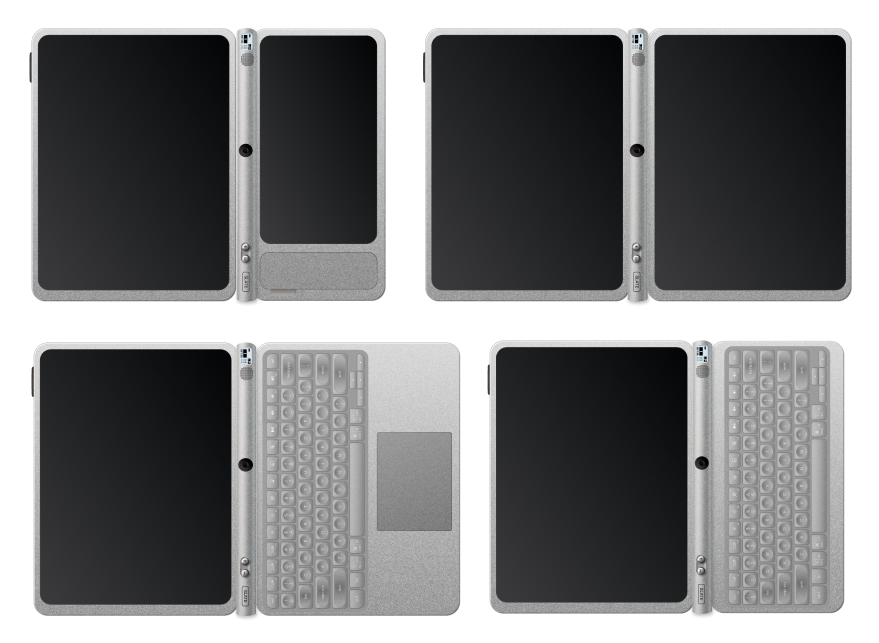
Tablet Mode
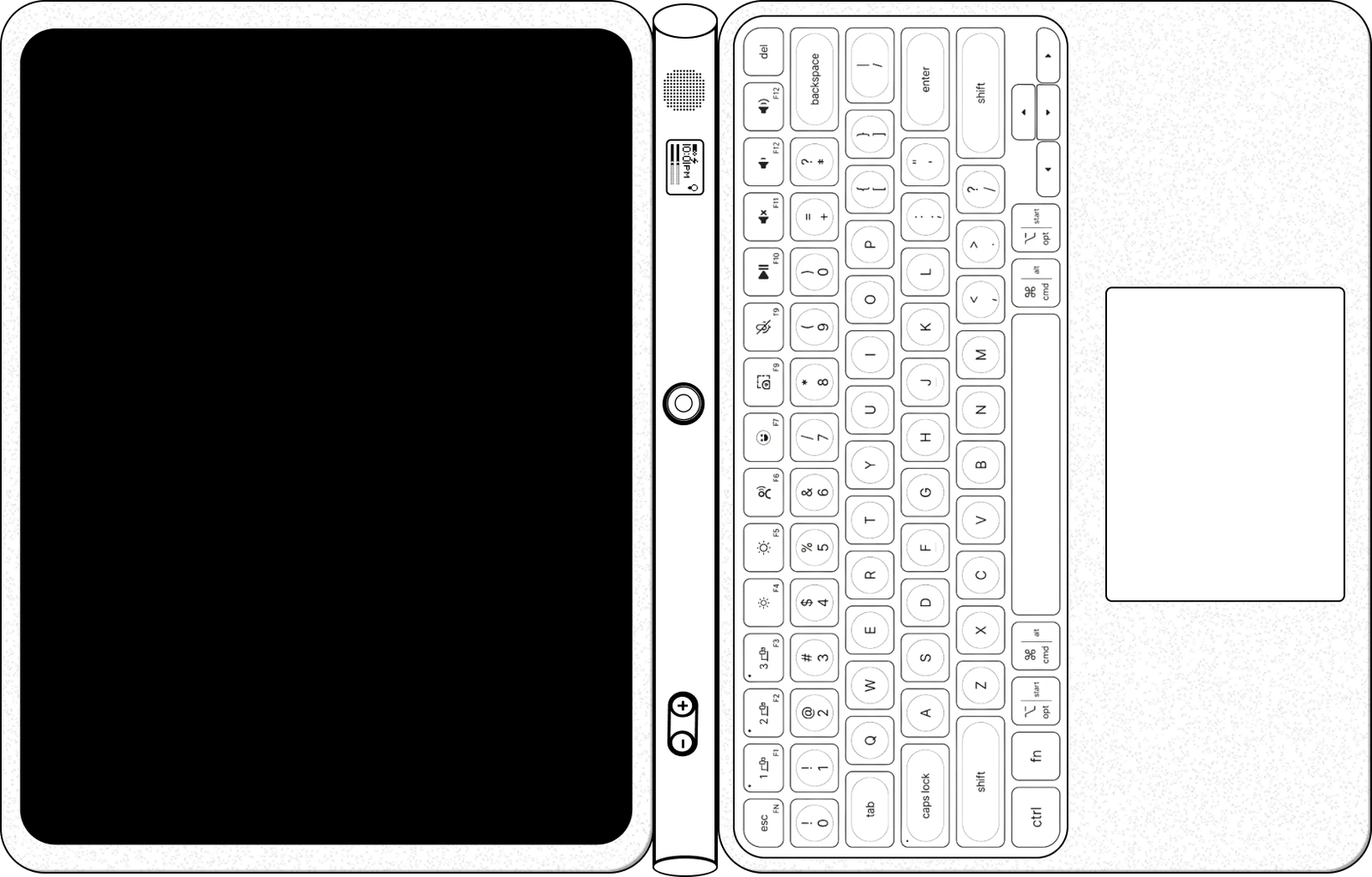
Core cylinder with a single touch display attached. The cylinder serves as an ergonomic grip along one edge. Ideal for individual reading, drawing, note-taking, and interactive apps. The most common configuration for younger students (K-5) who need simple, intuitive interaction.
Laptop Mode
Core serves as the hinge spine between a keyboard module and display. The 180-degree hinge allows flat-lay for collaborative work. Designed for extended writing, coding practice, and productivity tasks. Preferred by older students (6-12) and teachers for lesson planning.
Dual-Screen Mode
Two displays attached to the core - typically an e-ink panel and an LCD/OLED panel. Opens like a book for reference + active work. The flagship educational configuration, enabling simultaneous reading and interactive content without tab-switching.
E-Reader Mode
Core with a single e-ink display. Ultra-low power consumption provides multi-day battery life. Optimized for long-form reading, standardized testing, and outdoor use where LCD screens wash out in sunlight. The lightest configuration at under 350g.

Classroom Software Experience
The hardware is only half the story. I designed the software layer to address real classroom workflows.
Classroom Manager
A teacher-facing dashboard that shows the configuration state of every student device in real-time. Teachers can:
- Push content simultaneously to all student e-ink displays
- Lock specific screens during assessments
- Monitor battery levels and flag devices that need charging
- Group students for collaborative dual-screen activities
Offline-First Content
Research revealed that 23% of students lack reliable home internet. The content management system was designed offline-first:
- Textbooks and assignments sync when connected, then work fully offline
- E-ink content requires zero bandwidth once loaded
- Student work saves locally and syncs when connectivity returns
- Teachers can side-load content via the magnetic connector
Accessibility Features
Accessibility was a core design requirement, not an afterthought. I designed for the full spectrum of learner needs:
- Text-to-speech with synchronized e-ink highlighting
- OpenDyslexic and other dyslexia-friendly font options system-wide
- Stylus handwriting recognition for students who struggle with typing
- High-contrast mode optimized for each display type
- Audio descriptions for visual content on the LCD screen
Assessment & Exam Mode
Standardized testing was a major pain point identified in research. The exam mode I designed addresses key concerns:
- Locks the device to a single application with no app-switching
- E-ink display shows the test (no screen glare, no blue light fatigue)
- LCD display is disabled or shows a proctor-controlled view
- Tamper detection alerts if modules are detached during a test
- Automatic submission when time expires, even offline
On-Device AI Tutor
I explored a concept for an on-device AI tutor that runs locally on the compute core, requiring no internet connection. The AI tutor adapts to individual learning pace, provides hints rather than answers, and generates practice problems tailored to each student's demonstrated understanding. In dual-screen mode, the tutor's conversational interface appears on the LCD while the student's work remains on the e-ink display - maintaining focus while providing real-time support. Teachers can review AI interaction logs to identify students who need additional help, making the tutor a bridge between self-directed learning and teacher intervention.
Results & Impact
Patent Filing — In Progress
The design registration under The Designs Act, 2000 (India) is currently being prepared. The filing will cover the industrial design of the cylindrical core, the magnetic coupling mechanism, and the modular display attachment system.
The application documents the novel cylindrical form factor as a computing device enclosure — a departure from all existing rectangular computing device designs in the market.
9 Protectable Claims
The patent application establishes 9 distinct protectable claims covering the modular system architecture. These include the cylindrical compute core geometry, the magnetic rail coupling mechanism, the hot-swap display detection protocol, the bidirectional power flow system, and the dual-screen content routing logic.
Each claim was informed by the user research I conducted - ensuring that the protected innovations solve real problems, not hypothetical ones.
Bidirectional Power Innovation
One of the most technically novel aspects of the design is bidirectional power flow through the magnetic connector. Display modules with auxiliary batteries can charge the core, and the core can charge the displays. This means the system's total battery capacity scales with its configuration.
In education, this solves the "dead device by 2pm" problem - attaching a fresh display module in the afternoon extends battery life without interrupting learning.
Next Steps
The project moves forward with CAD prototyping to validate the magnetic coupling mechanism's physical tolerances and durability through repeated attach/detach cycles.
User testing with K-12 students and teachers is planned to validate the dual-screen content routing rules and refine the Classroom Manager interface. Long-term, the system is designed for a third-party module ecosystem where display manufacturers can create compatible modules.
Design Philosophy
The research kept circling back to one tension: screens that are good for reading are bad for video, and screens good for video cause eye strain during long study sessions. Students spend hours reading textbooks and notes — that demands e-ink. But the moment a concept needs a diagram, animation, or video explanation, e-ink falls short. Existing devices force a choice between the two. The dual-screen approach came directly from that friction — not as a technical novelty, but because learning genuinely needs both, often at the same time. The modular form factor is just the logical extension: if different contexts need different displays, let the hardware adapt instead of forcing the user to compromise.
